● Product Designer · open to opportunities

Complex products, simple experiences.

I bring research, data and AI into the process to design from discovery to design system.

Projects

My main projects

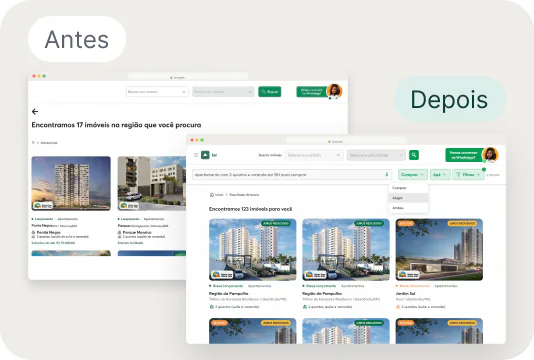
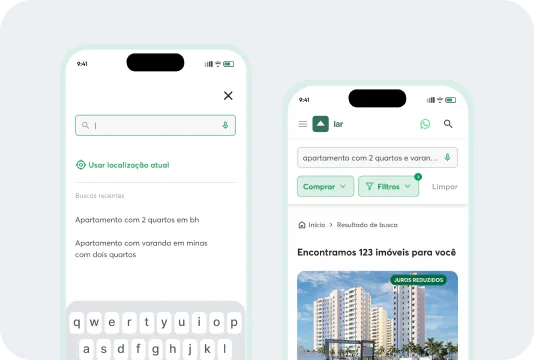
Large real estate developer · AI · Real estate · 2026

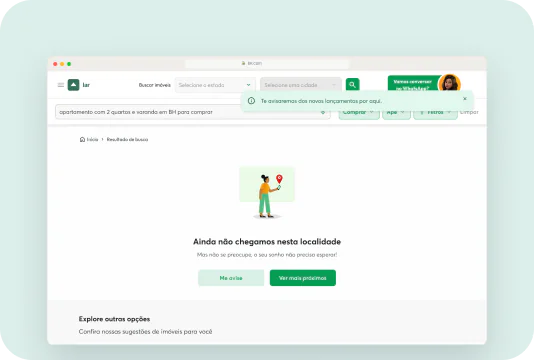
AI search: from filtering by city to searching by lifestyle

The question that guided it

What if people could search for a home by what they prioritize, not just by city?

  • AI on the website without the cost of a chat
  • The old search kept for people who already used the site
  • Piloting in a few cities, collecting results
Read full case

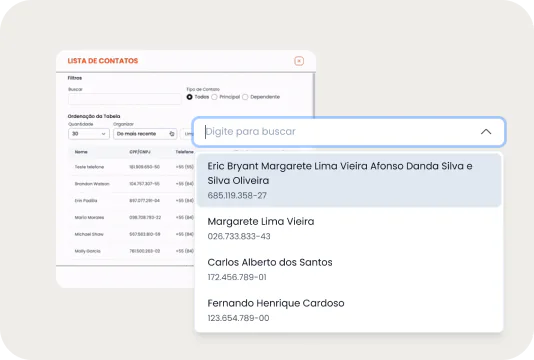
Imobanco · Fintech · Design system · 2025

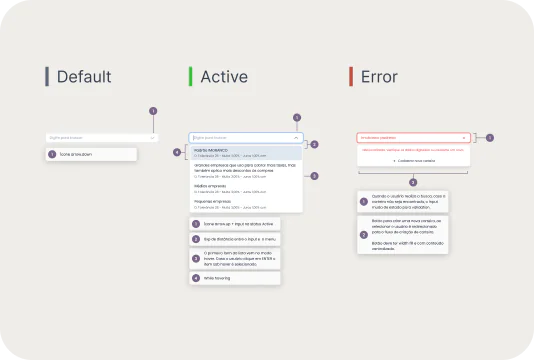
Fewer clicks in a component used all day long

The question that guided it

How do you stop a component used all day from getting in the way, without putting financial flows at risk?

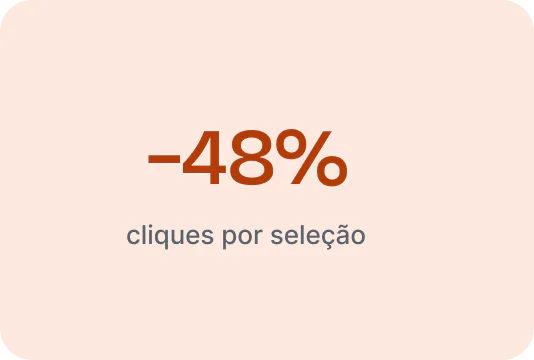
  • 48% fewer clicks per selection and from 11 to 5 seconds to complete
  • Validated in one feature before scaling
  • Now the standard across the whole platform
Read full case

Other work

Smaller projects, real decisions

View clickable prototype

swipe to see more

Process

How I work

01

Research

I find the real problem before designing the solution, through interviews and journey analysis.

  • Interviews
  • Nielsen's 10 heuristics
  • Hotjar
  • Journey map

02

Data

I use real usage data to prioritize and to measure whether the solution worked.

  • 62% on mobile
  • 11 s → 5 s
  • −48% clicks
  • Usage data

03

AI in the process

I use AI to map, prototype and test faster, without losing sight of the user.

  • Claude
  • Gemini
  • ChatGPT
  • Lovable
  • Figma Make
Get to know me

FAQ

Quick answers

What is your area of focus?

Complex digital products, mainly fintech and real estate. I like critical flows, where a mistake is costly, and making decisions with research and usage data.

How many years of experience do you have?

About two and a half years in product design. I started at SouJunior in 2024, and today I work at Imobanco (banking as a service) and, through Igma, with a real estate client.

What tools do you use?

Figma and FigJam day to day, Figma Make for motion and micro-interactions, Hotjar and usage data for research, and HTML/CSS when I need to adjust layouts. On the AI side, I use Claude, Gemini, ChatGPT and Lovable.

How do you use AI in your work?

From discovery to handoff: to map flows (I've mapped the navigation of an entire website with Claude), synthesize research, prototype, refine microcopy and animate interfaces. My role is to build the foundation, make the decisions and refine what the AI delivers. This portfolio was designed in Figma and built with Claude.

Do you work alone or in a team?

Both. In product teams, with PMs and developers, I deliver handoffs with states and rules. I've paired with other designers (Imobanco onboarding and Tarsis) and worked solo on design challenges.

Shall we talk?

I like turning ideas into simple experiences. If you want to talk about design, research or opportunities, I'd love to hear from you.

Message me on WhatsApp

Onboarding redesign · Imobanco

1 / 9

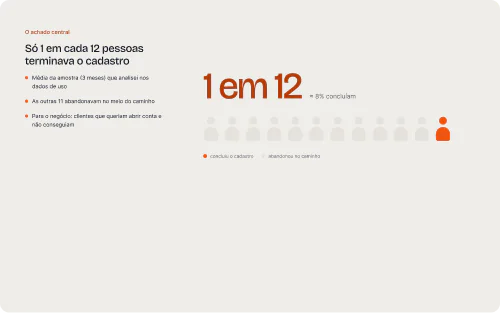
  1. The core finding: Only 1 in 12 people finished signing up.
    The core findingOnly 1 in 12 people finished signing up.Sample average (3 months) I analyzed in the usage data. The other 11 dropped off along the way. For the business: customers who wanted to open an account and couldn't. (≈ 8% completed)
  2. The starting point: Creating an account took 47.5 minutes on average.
    The starting pointCreating an account took 47.5 minutes on average.Ranging from 17 to 78 minutes depending on the month. The market promises up to 5 minutes (platforms like Asaas). Usage data from the current flow, analyzed by me.
  3. What the research showed: Four bottlenecks explained the delay.
    What the research showedFour bottlenecks explained the delay.Heatmaps, session recordings and time per screen. 01 Email verification: confusing links and resends stalled the start. 02 Document upload: unclear upload and errors only at the end. 03 Password creation: many errors and confusion between the two types of password. 04 Coming back after review: few returned after waiting for approval.
  4. Sign-ups on mobile web: 47% in May, 62% in June, 81% in July.
    Sign-ups on mobile web47% in May, 62% in June, 81% in July.Base: 53 of 86 sessions recorded on Hotjar, from May to July. The previous solution had only been designed for desktop; in the new one, every step was also designed for mobile. (Screens: account type, CPF, personal details.)
  5. Before you start: A summary of the steps right at the entrance.
    Before you startA summary of the steps right at the entrance.People know what they'll need before they begin. Review time stated from the start.
  6. Email verification: A 6-digit code instead of a link.
    Email verificationA 6-digit code instead of a link.Change the email on the same screen. Resend with a visible countdown. Solves bottleneck no. 1.
  7. Password creation: Each password at the right moment, with requirements in view.
    Password creationEach password at the right moment, with requirements in view.Access and authorization passwords separated and explained. Requirements validated as the person types.
  8. Documents: Front and back separated, no guesswork.
    DocumentsFront and back separated, no guesswork.Upload by dragging or selecting. Errors shown on the field, not only at the end.
  9. Review: Review everything before sending for approval.
    ReviewReview everything before sending for approval.Fewer sign-ups rejected because of wrong data. Steps visible from start to finish.

Research done by me; UI paired with another designer.

Swipe sideways · tap the image to zoom in

Personal finance app · Tarsis

1 / 8

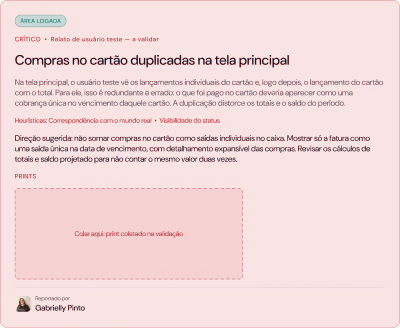
  1. The starting point: A real user found what the analysis wouldn't.
    The starting pointA real user found what the analysis wouldn't.46 documented issues: 30 from the heuristic analysis, 16 from real use. 5 of 5 critical ones came from real use: card purchases counted twice in the balance; installment amount confused with the total; wrong account preselected when adding an entry; income total adding up amounts not yet received; deleting an installment purchase without asking about future installments.
  2. Before and after: From a spreadsheet to a view of the month.
    Before and afterFrom a spreadsheet to a view of the month.Before: a “Spreadsheet” with filters taking up the first fold; card purchases added twice to the balance; green almost everywhere, with no defined role. After: cards, chart and list in one place (Transactions); the card bill as a single expense, with the purchases inside; color only for actions and for what needs attention.
  3. How we found the problems: 46 issues, from two sources.
    How we found the problems46 issues, from two sources.Paired heuristic analysis (Nielsen's 10 heuristics, screen by screen) and real use (a test user entering their own finances). Critical: 5 (all from real use). High impact: 17 (8 from real use, 9 from the analysis). Low impact: 18 (2 and 16). Cosmetic: 6 (1 and 5).
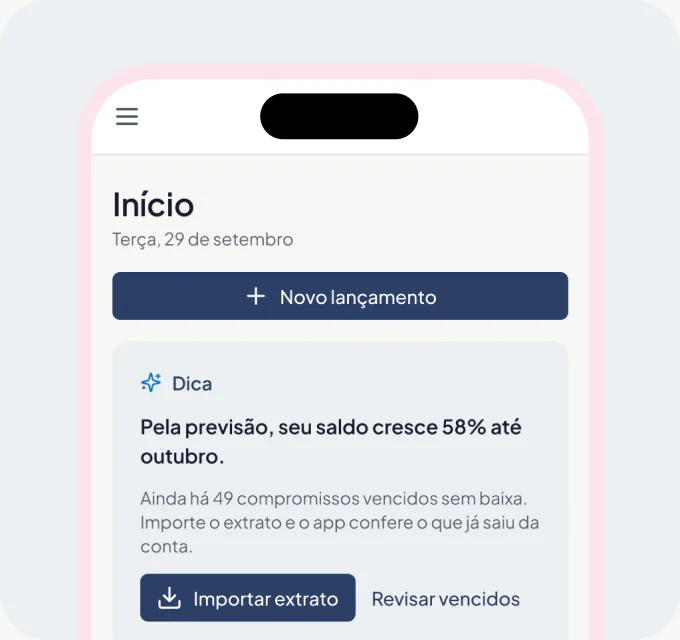
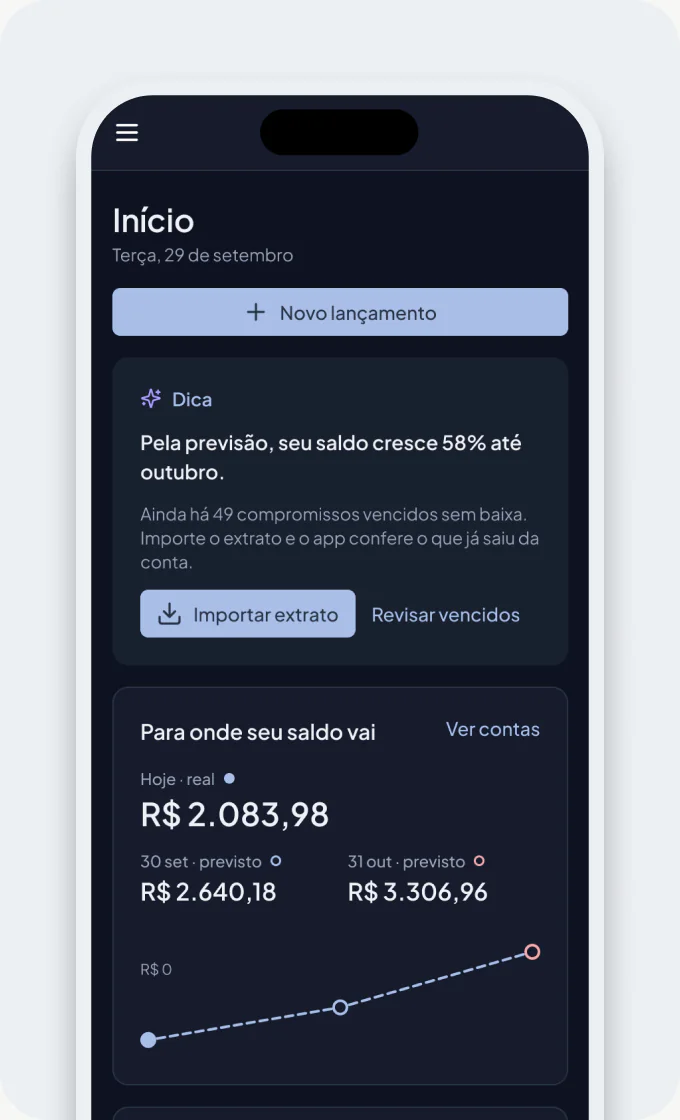
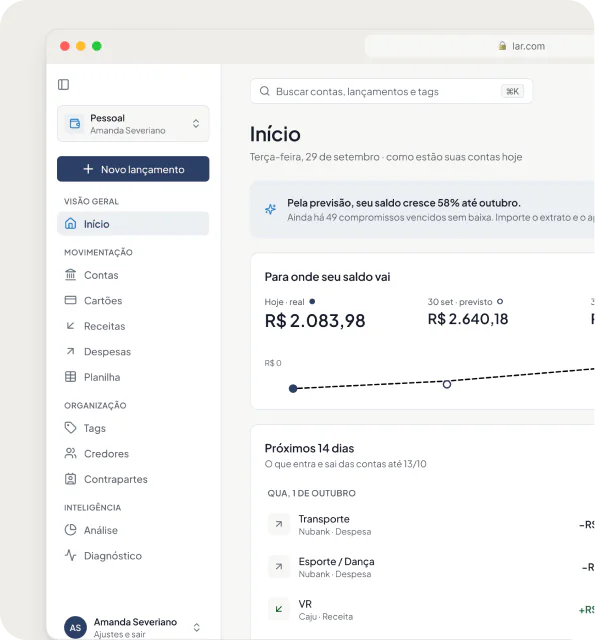
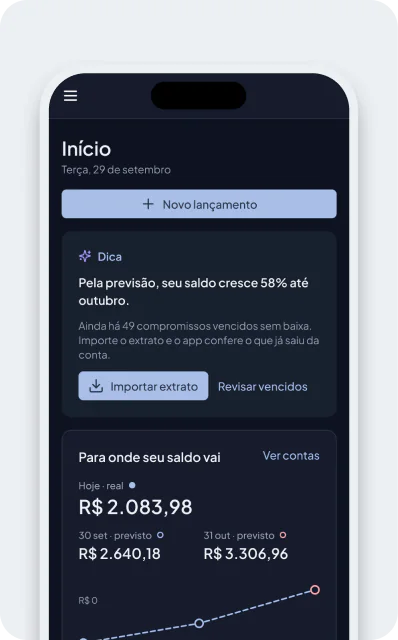
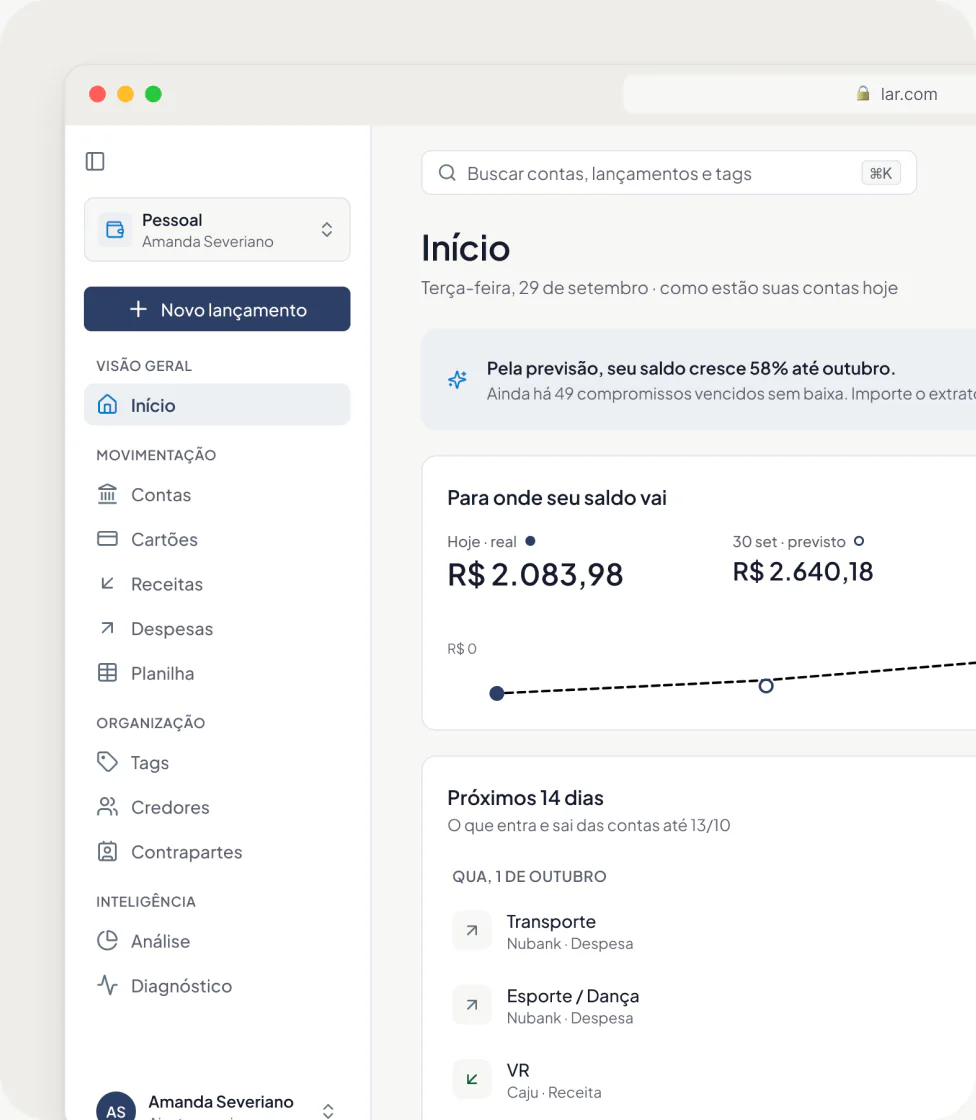
  4. Home: What's going to happen to your balance.
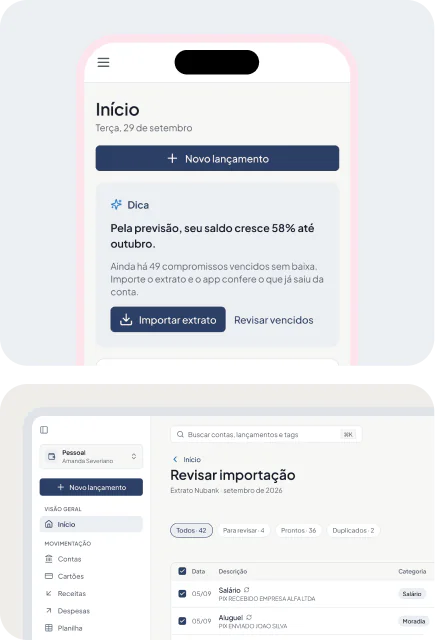
    HomeWhat's going to happen to your balance.Actual and forecast balance, with a forecast line to the end of the month. Mark as paid in one click, right from the schedule.
  5. Transactions: The card bill as a single expense, with the purchases inside.
    TransactionsThe card bill as a single expense, with the purchases inside.The card counts in the month the bill is paid. Red only for what the person can fix; expenses in graphite.
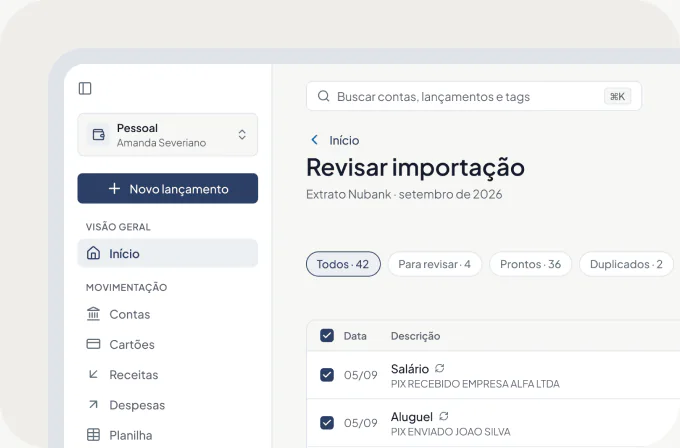
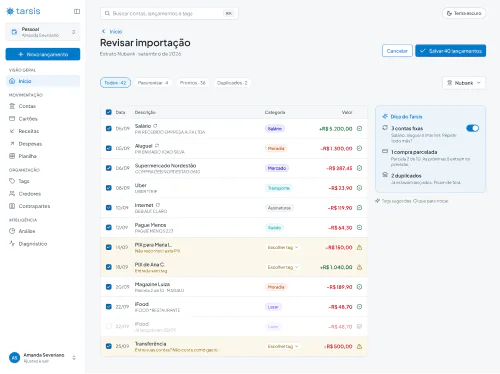
  6. AI import: Import the statement and review before saving.
    AI importImport the statement and review before saving.People check what the AI read before it becomes an entry. A notice when the statement has already been imported, with or without new items.
  7. Mobile and dark theme: The same logic on mobile and in the dark.
    Mobile and dark themeThe same logic on mobile and in the dark.The dark theme comes only from switching the variables' mode. Home and Transactions adapted to 375 px.
  8. Where it stands today: Ready for development, no usage data yet.
    Where it stands todayReady for development, no usage data yet.Home and Transactions delivered as “Ready for dev”. 24 of the 46 issues still marked as “to validate”. Next steps: validate with the user (starting with the critical ones); decide with the team (month baseline, alert limits, subtags); implementation order (Home first, then the spreadsheet).

Paired research — a colleague organized the test user's reports and started the heuristic analysis; I analyzed the logged-out area and part of the logged-in area and was responsible for the solution.

Swipe sideways · tap the image to zoom in

Design challenge · Contato Seguro

1 / 9

  1. The starting point: Blocking a member carried the same weight as editing a phone number.
    The starting pointBlocking a member carried the same weight as editing a phone number.The screen controls who can access the ethics channel's reports. Six sections (User details, Companies, Profile, Departments, Access, Change log) and three sensitive actions (Send new password, Block access, Deactivate user) with the same emphasis. 3 sensitive actions at the same visual level as editing.
  2. Before and after: The same screen, with a different hierarchy.
    Before and afterThe same screen, with a different hierarchy.Before: three high-contrast buttons for sensitive actions; a form that was always editable, with no read mode; a floating “Save” that didn't say what it saved. After: sensitive actions kept discreet, away from editing; reading first, each block with its own “Edit”; per-company permissions in a single list.
  3. What the heuristic analysis showed: Four risks on a screen that controls who sees reports.
    What the heuristic analysis showedFour risks on a screen that controls who sees reports.Nielsen's 10 heuristics applied to the current screens; references: ethics channels and settings screens. 01 Destructive actions next to editing. 02 A “Save” with no scope. 03 System terms (“Profile”, “Access” and “Departments” were ambiguous). 04 It didn't scale.
  4. The core decision: Permission per company, not a single profile.
    The core decisionPermission per company, not a single profile.The same member can be an editor in one company and a viewer in another. Option A (one profile for all): simpler to build and audit, but doesn't cover different roles. Option B, chosen (one profile per company): reflects real use and scales to large groups, with a more complex interface. How I reduced the cost: a visual chain Profile › Departments › Committees in a single line; an alert with a link to a tutorial.
  5. Information and history: View first, edit only with intent.
    Information and historyView first, edit only with intent.Fields stay read-only until the person clicks Edit. History in reverse order: the most recent on top.
  6. Sensitive actions: Block and deactivate got out of the way.
    Sensitive actionsBlock and deactivate got out of the way.They became discreet actions at the top, away from everyday editing. Deactivating asks for confirmation and states the consequence.
  7. Permissions: Add a company without leaving the page.
    PermissionsAdd a company without leaving the page.A side panel with company, profile, departments and committees. System terms replaced with labels that make sense to admins.
  8. Mobile: The same logic on mobile.
    MobileThe same logic on mobile.Top actions grouped in a “Manage” menu. Full-screen editing, with “Save changes” fixed at the bottom.
  9. What comes next: The proposal still needs to be tested.
    What comes nextThe proposal still needs to be tested.Delivered as a design challenge, without user testing. Microcopy refined with AI support (Gemini and ChatGPT). Next steps: 01 Usability test (prototype with 4 tasks ready); 02 Iterate (mainly the discoverability of the discreet actions); 03 Guided tour.

Product Design challenge (Dec 2025), done solo. · View clickable prototype

Swipe sideways · tap the image to zoom in